
DottieNote 2.0 is not just a bundle of new features. It is a clearer product line: when a task appears, it should be easy to capture; when you are ready to begin, the entry point should be low-friction; when you finish a focus session, the effort should leave a visible trace.
This release is organized around four questions:
- Can temporary tasks enter the system faster?
- Can recurring focus contexts begin with a more natural gesture?
- Can completion feel more memorable than checking off a row?
- Can multi-device use feel steadier and more controllable?
Voice task creation
Version 2.0 further refines voice task creation. For example, you can say “Remind me tomorrow at 10 a.m. to review English for 30 minutes.” DottieNote will try to turn this into editable task details for you to review and confirm.
Voice parsing is supported by cloud services. We do not store your recordings, recognized text, or parsed task content; the processing exists only to complete the current task creation request.
Quick Add has also been refreshed with a bottom input panel that is ready when an idea appears. For tasks without a fixed start time, Anytime Plans let you keep the item in your plan before deciding exactly when to do it.
New planet collection series
We have never wanted DottieNote to feel like a cold timer. Version 2.0 continues to turn focus sessions into visible collection progress. It introduces two new planet series, Fruit Paradise and Space Voyage, with a refreshed hand-drawn visual style.
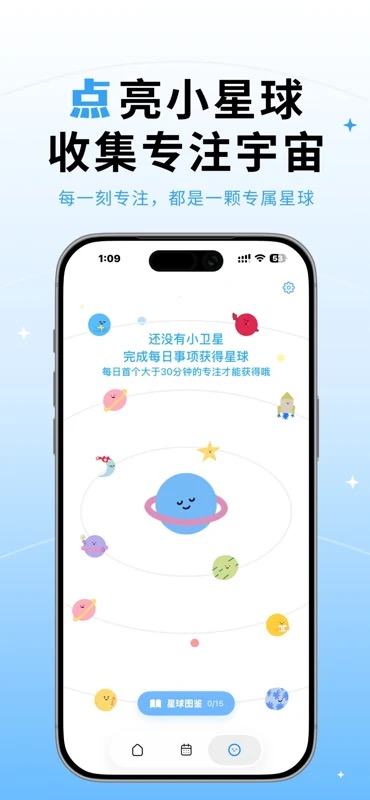
The planet draw experience also includes a new celebration animation. The goal is simple: make the moment of finishing clear enough that you want to repeat it.
Share your focus wins
Sharing now supports task completion cards, planet unlock cards, collection cards, and universe screenshots. You can save them for yourself or post them to platforms such as Xiaohongshu, Weibo, and Moments.
The point is not to create ranking pressure. It is to keep a small piece of evidence that you showed up today.
iCloud sync and stability
DottieNote 2.0 supports iCloud sync across Apple devices. Local data remains the foundation of the experience; iCloud extends it so you can continue checking tasks, plans, and parts of your focus history across devices.
We also added migration safeguards to reduce upgrade risk.
This release improves Dottie Sticker recognition and binding, universe zoom and planet focus interactions, tag management, date and time zone handling, VoiceOver support, and Dynamic Type support. It also fixes issues around legacy data migration, Live Activities, and timer state recovery.
Where to start
If you have just upgraded to 2.0, start with three actions:
- Create one real task for today with Quick Add or voice.
- Bind a Dottie Sticker to a fixed context such as your desk, bedside table, or work setup.
- Complete a 25 to 30 minute focus session, then review your focus record and planet collection progress. This suggested duration does not guarantee a new planet.
Those three actions cover the main loop of 2.0: capture, begin, complete. The atlas, sharing, sync, and help docs can unfold from there.
What comes after 2.0
DottieNote 2.0 reconnects the main product experience, but it is not the endpoint. Voice task creation needs to become easier to understand. iCloud sync needs clearer status feedback. The planet atlas needs more series and a steadier collection experience. Dottie Sticker also needs better help content and recovery paths for binding.
Those follow-up items may look separate, but they serve the same goal: helping users start more easily in everyday life, and feel safer using DottieNote over time.
We do not want DottieNote to become a complex system that users have to maintain every day. Future iterations will continue to prioritize lighter entry points, clear confirmation, recoverable flows, and transparent data explanations.
New users do not need to understand everything at once
DottieNote 2.0 has more features than the early versions, but new users should not have to understand all of them on day one. The better starting point is simple: choose one real task for today, complete a short focus session, then explore stickers, the atlas, sharing, and sync when they become useful.
Complexity should appear when it is needed, not push people away on the first screen. DottieNote will keep refining onboarding, the help center, and article content so users know what they can do next, while also knowing they do not need to set up everything immediately.
If 2.0 has one message, it is this: tasks should be faster to capture, focus should be lighter to begin, and completion should leave a result worth looking back on.